
 JPN
JPN ENG
ENGKYC Flow

Prepare your ID

Read QR code
with your phone

Take 3 photos
and a movie
1st Step : Prepare your ID
The types of Photo IDs we accept differ between domestic Koreans and foreigners. Please check below.
1. Residences card
2. Driver’s license
3. Adolescent card
1. Alien Registration Card
2. Overseas Korean Resident Card
3. Permanent Resident Card
4. Passport
For Domestic
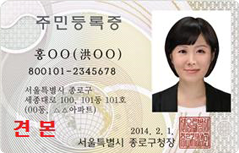
Residences card
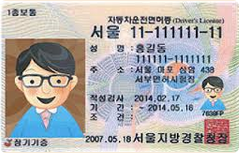
Driver’s license
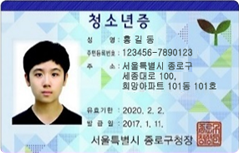
Adolescent card
For Foreigner
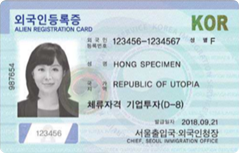
Alien Registration Card
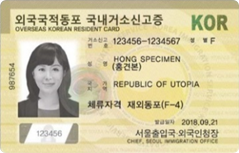
Overseas Korean Resident Card
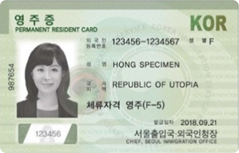
Permanent Residence Card
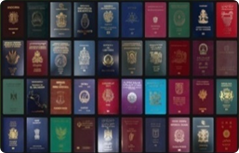
Passport
2nd Step : Read QR code with your phone
Click ‘ID Verification’ button below and scan QR code with your phone.
| General method: | open ‘Camera’ app and scan the QR code. When popup or button appears, please push the popup or button to proceed. |
|---|---|
| Alternative method: | open or download ‘Google Lens’ app and scan the QR code. When popup appears, please push the popup to proceed. |
3rd Step : Take photos of your ID
Choose what ID you want to upload and take photos of ID following the guidelines.
You will take three photos of your ID and a 5-seconds video of you holding your ID.
1) Front of your ID
2) Side of your ID (Thickness of your ID should be visible)
3) Back of your ID
4) You and your ID (5 Seconds video)
* Please make sure that you take your photos as clear as possible, otherwise you may be asked to retake the photos.
4th Step : Register your Account
We provide two ways to register your bank. Please check below.
Access 'My Page > Account List' and click 'Add new account' to get started.
1. Select 'By Personal ID Number' as the authentication method.
2. Select your bank from the list and input your account number.
3. Select ID type you used to open the account and fill in ID number.
4. Press 'Confirm'. If all is OK, your bank account will be registered.
1. Select 'By 1 KRW Deposit' as the authentication method.
2. Select your bank from the list and input your account number.
3. Press 'Deposit 1 KRW' button and check your account.
4. Input the code we have sent along into 6-Digit 'Authentication Code'.
5. Press 'Confirm'. If all is OK, your bank account will be registered.